# Annotations

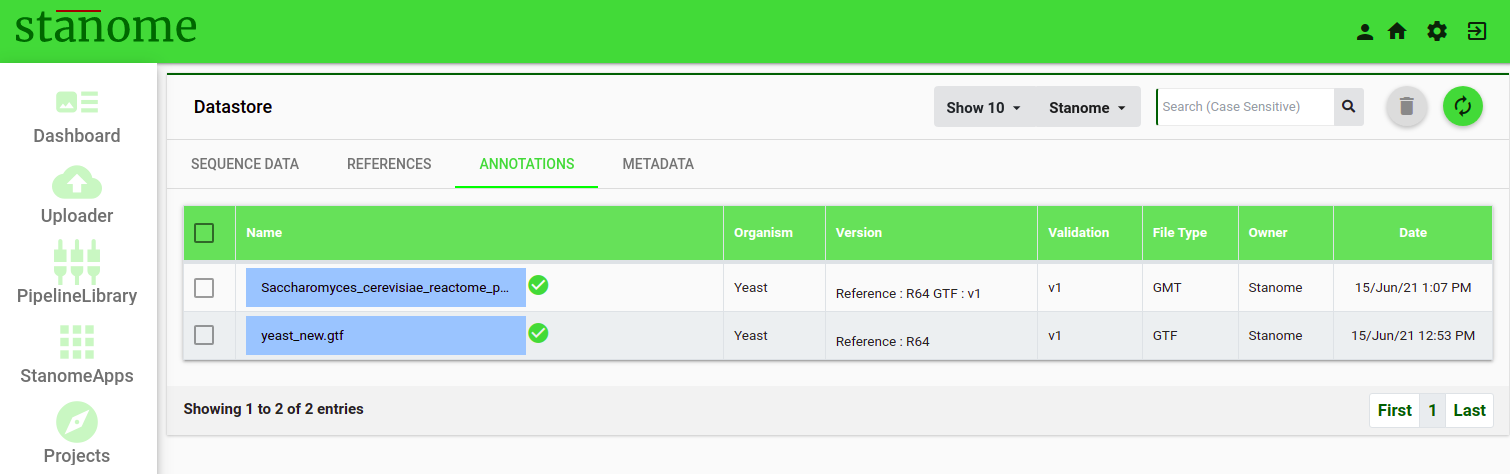
<span style="font-size: 12pt; font-family: Montserrat, sans-serif; color: #232a3c; background-color: transparent; font-weight: 400; font-style: normal; font-variant: normal; white-space: pre-wrap;">Click the </span><span style="font-size: 12pt; font-family: Montserrat, sans-serif; color: #38761d; background-color: transparent; font-weight: bold; font-style: normal; font-variant: normal; white-space: pre-wrap;">Annotations </span><span style="font-size: 12pt; font-family: Montserrat, sans-serif; color: #232a3c; background-color: transparent; font-weight: 400; font-style: normal; font-variant: normal; white-space: pre-wrap;">tab after clicking the </span><span style="font-size: 24pt; font-family: Montserrat, sans-serif; color: #232a3c; background-color: transparent; font-weight: 400; font-style: normal; font-variant: normal; white-space: pre-wrap;"><span style="border-width: initial; border-style: none; display: inline-block; overflow: hidden; width: 44px; height: 35px;">![](https://lh6.googleusercontent.com/WMAow0X8Tql_TTEjZiWCZhiLyU0wNFP6tgILZ24H49jhqTBN-zPtB6X4uiWavPnlaAnp-9273ON86dSzDzEyCqlLAm7MzrtWAO-g6Cm5MOXV0CRuCYPN5AvkQWZE0FdbmbD9GLoF)</span></span> <span style="font-size: 12pt; font-family: Montserrat, sans-serif; color: #232a3c; background-color: transparent; font-weight: 400; font-style: normal; font-variant: normal; white-space: pre-wrap;">icon to access the </span><span style="font-size: 12pt; font-family: Montserrat, sans-serif; color: #38761d; background-color: transparent; font-weight: bold; font-style: normal; font-variant: normal; white-space: pre-wrap;">Annotations</span><span style="font-size: 12pt; font-family: Montserrat, sans-serif; color: #232a3c; background-color: transparent; font-weight: 400; font-style: normal; font-variant: normal; white-space: pre-wrap;"> window (Fig.). The </span><span style="font-size: 12pt; font-family: Montserrat, sans-serif; color: #38761d; background-color: transparent; font-weight: bold; font-style: normal; font-variant: normal; white-space: pre-wrap;">Annotations</span><span style="font-size: 12pt; font-family: Montserrat, sans-serif; color: #232a3c; background-color: transparent; font-weight: 400; font-style: normal; font-variant: normal; white-space: pre-wrap;"> window shows the list of the annotation files, which are utilized in the functional annotations applications, such as </span>

- - - <span style="font-size: 12pt; font-family: Montserrat, sans-serif; background-color: transparent; font-weight: 400; font-style: normal; font-variant: normal; white-space: pre-wrap;">Gene Models (GFF/GTF);</span>
        - <span style="font-size: 12pt; font-family: Montserrat, sans-serif; background-color: transparent; font-weight: 400; font-style: normal; font-variant: normal; white-space: pre-wrap;">Pathway (GMT); </span>
        - <span style="font-size: 12pt; font-family: Montserrat, sans-serif; background-color: transparent; font-weight: 400; font-style: normal; font-variant: normal; white-space: pre-wrap;">Gene Ontology (GO);</span>
        - <span style="font-size: 12pt; font-family: Montserrat, sans-serif; background-color: transparent; font-weight: 400; font-style: normal; font-variant: normal; white-space: pre-wrap;">Antibiotic Resistance (ABR); and </span>
        - <span style="font-size: 12pt; font-family: Montserrat, sans-serif; background-color: transparent; font-weight: 400; font-style: normal; font-variant: normal; white-space: pre-wrap;">Variant Effect Predictor (VEP).</span>
        - <span style="font-size: 12pt; font-family: Montserrat, sans-serif; background-color: transparent; font-weight: 400; font-style: normal; font-variant: normal; white-space: pre-wrap;">Variations</span>

<span style="font-size: 12pt; font-family: Montserrat, sans-serif; color: #232a3c; background-color: transparent; font-weight: 400; font-style: normal; font-variant: normal; white-space: pre-wrap;">The paginated window displays 10 annotations, by default, per page and can be increased to show 20, 40, 60, 80, 100 annotations. The search box (Fig.) on the top right corner of the page allows users to filter annotations with file names, type, organism name, or version. During upload, the annotation files undergo a rigorous validation process for file format, integrity, and content. </span>

<span style="font-size: 12pt; font-family: Montserrat, sans-serif; color: #232a3c; background-color: transparent; font-weight: 400; font-style: normal; font-variant: normal; white-space: pre-wrap;">Examples: </span>

- - - <span style="font-size: 12pt; font-family: Montserrat, sans-serif; background-color: transparent; font-weight: 400; font-style: normal; font-variant: normal; white-space: pre-wrap;">Gene Models should be compatible with the reference genome version.</span>
        - <span style="font-size: 12pt; font-family: Montserrat, sans-serif; background-color: transparent; font-weight: 400; font-style: normal; font-variant: normal; white-space: pre-wrap;">Pathway and Gene Ontology files are validated against the corresponding Gene Models. </span>

<span style="font-size: 12pt; font-family: Montserrat, sans-serif; color: #232a3c; background-color: transparent; font-weight: 400; font-style: normal; font-variant: normal; white-space: pre-wrap;">Validation failed annotations are greyed out and displayed with a “Validation Failed” message. The failed annotations are not available for selection and should be deleted from the platform by the user.</span>

![Fig. 1. List view of the available Annotations on the platform.](https://docs.stanome.com/uploads/images/gallery/2022-01/embedded-image-ha2imhow.png)

<span style="font-weight: 400;">The list view shows seven fields :</span>

- **Name:**<span style="font-weight: 400;"> Filename</span>
- **Organism:**<span style="font-weight: 400;"> Organism to which annotation file corresponds to</span>
- **Version:**<span style="font-weight: 400;"> Reference version to which the annotation file is associated</span>
- <span style="font-weight: 400;">**Validation**: Version of the annotation file</span>
- **FileType:**<span style="font-weight: 400;"> Type of the file (Example: Pathway, GO, or VEP)</span>
- **Owner:**<span style="font-weight: 400;"> Owner of the file</span>
- **Date:**<span style="font-weight: 400;"> Displays the file upload date</span>