# Metadata

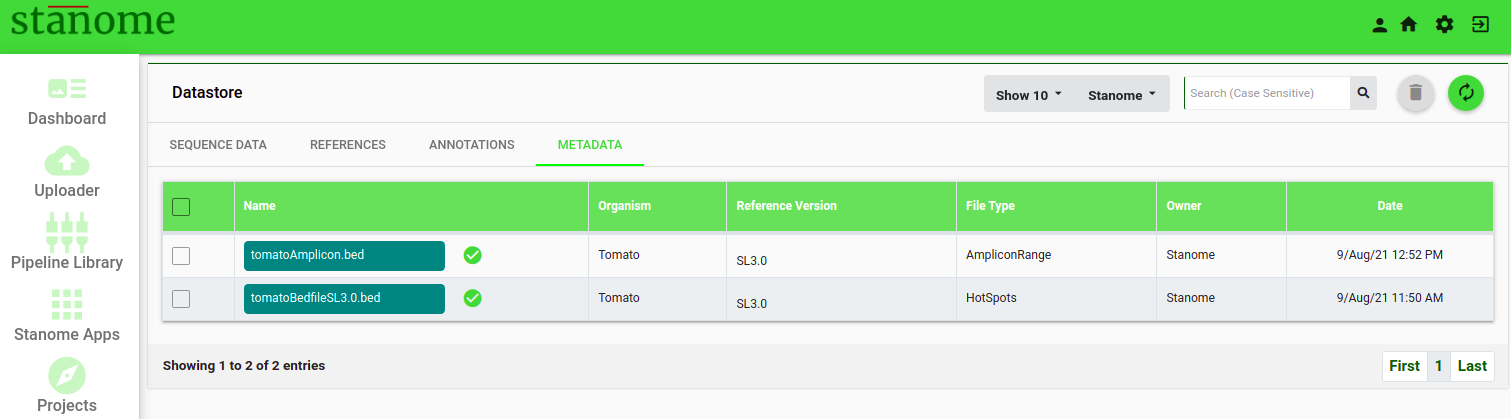
<span id="bkmrk-click-the" style="font-size: 12pt; font-family: Montserrat, sans-serif; color: #232a3c; background-color: transparent; font-weight: 400; font-style: normal; font-variant: normal; white-space: pre-wrap;">Click the </span><span style="font-size: 12pt; font-family: Montserrat, sans-serif; color: #38761d; background-color: transparent; font-weight: bold; font-style: normal; font-variant: normal; white-space: pre-wrap;">Metadata </span><span style="font-size: 12pt; font-family: Montserrat, sans-serif; color: #232a3c; background-color: transparent; font-weight: 400; font-style: normal; font-variant: normal; white-space: pre-wrap;">tab after clicking the</span><span style="font-size: 24pt; font-family: Montserrat, sans-serif; color: #232a3c; background-color: transparent; font-weight: 400; font-style: normal; font-variant: normal; white-space: pre-wrap;"><span style="border-width: initial; border-style: none; display: inline-block; overflow: hidden; width: 44px; height: 35px;">![](https://lh6.googleusercontent.com/WMAow0X8Tql_TTEjZiWCZhiLyU0wNFP6tgILZ24H49jhqTBN-zPtB6X4uiWavPnlaAnp-9273ON86dSzDzEyCqlLAm7MzrtWAO-g6Cm5MOXV0CRuCYPN5AvkQWZE0FdbmbD9GLoF)</span></span> <span style="font-size: 12pt; font-family: Montserrat, sans-serif; color: #232a3c; background-color: transparent; font-weight: 400; font-style: normal; font-variant: normal; white-space: pre-wrap;">icon to access the </span><span style="font-size: 12pt; font-family: Montserrat, sans-serif; color: #38761d; background-color: transparent; font-weight: bold; font-style: normal; font-variant: normal; white-space: pre-wrap;">Metadata</span><span style="font-size: 12pt; font-family: Montserrat, sans-serif; color: #232a3c; background-color: transparent; font-weight: 400; font-style: normal; font-variant: normal; white-space: pre-wrap;"> window (Fig.). The </span><span style="font-size: 12pt; font-family: Montserrat, sans-serif; color: #38761d; background-color: transparent; font-weight: bold; font-style: normal; font-variant: normal; white-space: pre-wrap;">Metadata</span><span style="font-size: 12pt; font-family: Montserrat, sans-serif; color: #232a3c; background-color: transparent; font-weight: 400; font-style: normal; font-variant: normal; white-space: pre-wrap;"> window shows the list view of Gene lists, Hotspots and Amplicon ranges uploaded by stanome or the user. These files are used as metadata during analysis. The window is restricted to display 10 (or more) Metadata files per page. The search box (Fig.) on the top right corner of the page allows users to filter files with name(s), type (i.e. gene list or hotspots), platform, or organism name. Metadata files are also checked for format and file integrity and their correspondence to a reference genome version. Only the validated files are available for consumption on the platform, and the remaining will be greyed out with the “Validation Failed” message.</span>

![Fig. 1. The Metadata window.](https://docs.stanome.com/uploads/images/gallery/2022-01/embedded-image-ojlr2zmq.png)

<span style="font-weight: 400;">The list view shows following six fields :</span>

- **Name:**<span style="font-weight: 400;"> Filename</span>
- **Organism:**<span style="font-weight: 400;"> Name of the organism to which metadata belongs to</span>
- **Reference Version:**<span style="font-weight: 400;"> Reference version to which metadata file correspond to</span>
- **FileType:**<span style="font-weight: 400;"> Type of the file e.g. Gene list, Hotspots, or Amplicon range</span>
- **Owner:**<span style="font-weight: 400;"> Owner of the metadata file</span>
- <span style="font-size: 12pt; font-family: Montserrat, sans-serif; color: #232a3c; background-color: transparent; font-weight: 400; font-style: normal; font-variant: normal; white-space: pre-wrap;">**Date:**<span style="font-weight: 400;"> Date of upload</span></span>