# Reports

Results of a pipeline execution are aggregated into easily understandable formats for quick viewing.

# Overview

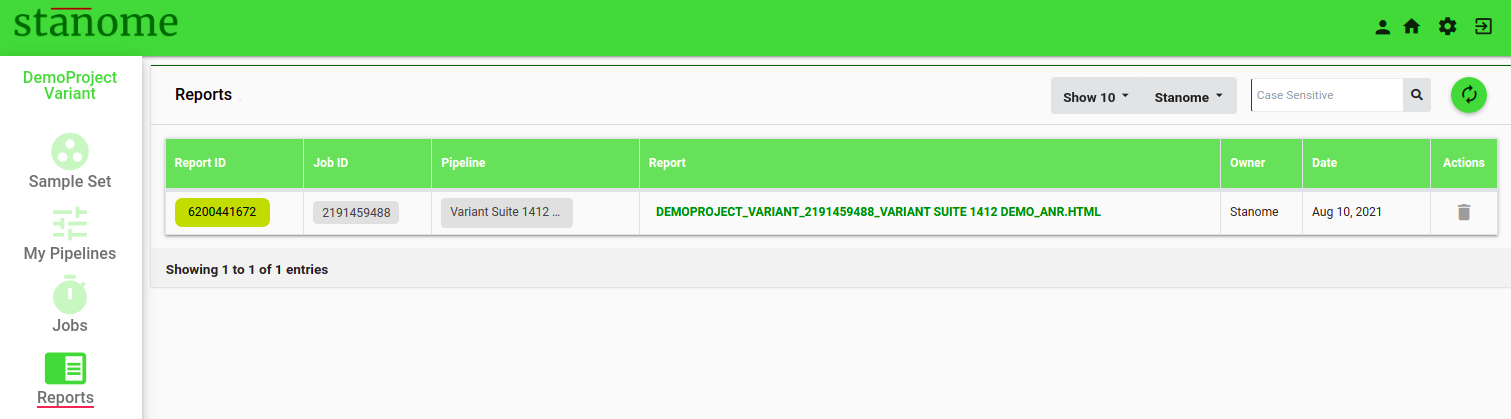
<span id="bkmrk-each-pipeline-execut-0" style="font-size: 12pt; font-family: Montserrat, sans-serif; color: #232a3c; background-color: transparent; font-weight: 400; font-style: normal; font-variant: normal; white-space: pre-wrap;">Each pipeline execution generates an HTML report. The final report and other files can be accessed through the Reports window</span><span style="font-size: 12pt; font-family: Montserrat, sans-serif; color: #232a3c; background-color: transparent; font-weight: 400; font-style: normal; font-variant: normal; white-space: pre-wrap;"><span style="border-width: initial; border-style: none; display: inline-block; overflow: hidden; width: 20px; height: 20px;">![](https://lh5.googleusercontent.com/rmxsNjby7wq96Ban9YE7K6AfGZnnrCEcbR770JKkqk6hkyftmbZfe0PHMHTmol51xG8JOjKtXYEKYeju2CvTdmSKUkGq30oyDAz8rxuGn1Q5tDOiDMadhx8KU-gAkQeqKh-tO4iE)</span></span><span style="font-size: 12pt; font-family: Montserrat, sans-serif; color: #232a3c; background-color: transparent; font-weight: 400; font-style: normal; font-variant: normal; white-space: pre-wrap;"> (Fig.). Reports can also be accessed through the ReportID on the job details page.</span>

[![Fig. 1. Reports Window](https://docs.stanome.com/uploads/images/gallery/2022-01/scaled-1680-/image-1643364378029.png)](https://docs.stanome.com/uploads/images/gallery/2022-01/image-1643364378029.png)

<span style="font-size: 12pt; font-family: Montserrat, sans-serif; color: #232a3c; background-color: transparent; font-weight: 400; font-style: normal; font-variant: normal; white-space: pre-wrap;"> </span>

- <span style="font-size: 12pt; font-family: Montserrat, sans-serif; background-color: transparent; font-weight: 400; font-style: normal; font-variant: normal; white-space: pre-wrap;">Click </span><span style="font-size: 12pt; font-family: Montserrat, sans-serif; background-color: transparent; font-weight: bold; font-style: normal; font-variant: normal; white-space: pre-wrap;">Report ID</span><span style="font-size: 12pt; font-family: Montserrat, sans-serif; background-color: transparent; font-weight: 400; font-style: normal; font-variant: normal; white-space: pre-wrap;"> to access intermediate files from a few important steps in the pipeline. </span>
- <span style="font-size: 12pt; font-family: Montserrat, sans-serif; background-color: transparent; font-weight: 400; font-style: normal; font-variant: normal; white-space: pre-wrap;">Click the </span><span style="font-size: 12pt; font-family: Montserrat, sans-serif; background-color: transparent; font-weight: bold; font-style: normal; font-variant: normal; white-space: pre-wrap;">PREFIX\_ANR.HTML</span><span style="font-size: 12pt; font-family: Montserrat, sans-serif; background-color: transparent; font-weight: 400; font-style: normal; font-variant: normal; white-space: pre-wrap;"> to access the final downloadable report. Default: NO REPORT AVAILABLE. </span>

<span style="font-size: 12pt; font-family: Montserrat, sans-serif; color: #232a3c; background-color: transparent; font-weight: 400; font-style: normal; font-variant: normal; white-space: pre-wrap;">Reports are generated dynamically based on the analysis type and each report is divided into sections based on the tools used in the pipeline. The first two sections are generated for all the jobs to provide the job overview: analysis summary and sample quality.</span>

- <span style="font-size: 14pt; font-family: Montserrat, sans-serif; color: #6aa84f; background-color: transparent; font-weight: bold; font-style: normal; font-variant: normal; white-space: pre-wrap;">Analysis Summary:</span><span style="font-size: 14pt; font-family: Montserrat, sans-serif; color: #000000; background-color: transparent; font-weight: bold; font-style: normal; font-variant: normal; white-space: pre-wrap;"> </span>

<span style="font-size: 12pt; font-family: Montserrat, sans-serif; color: #232a3c; background-color: transparent; font-weight: 400; font-style: normal; font-variant: normal; white-space: pre-wrap;">This section consolidates the information related to the job: project, samples, and the experiment in four sub-sections:</span>

- - - <span style="font-size: 12pt; font-family: Montserrat, sans-serif; background-color: transparent; font-weight: 400; font-style: normal; font-variant: normal; text-decoration-line: underline; text-decoration-skip-ink: none; white-space: pre-wrap;">Project Details</span><span style="font-size: 12pt; font-family: Montserrat, sans-serif; background-color: transparent; font-weight: 400; font-style: normal; font-variant: normal; white-space: pre-wrap;">: This shows the information provided during the project creation and</span> the pipeline details.
        - <span style="font-size: 12pt; font-family: Montserrat, sans-serif; background-color: transparent; font-weight: 400; font-style: normal; font-variant: normal; text-decoration-line: underline; text-decoration-skip-ink: none; white-space: pre-wrap;">Run Summary</span><span style="font-size: 12pt; font-family: Montserrat, sans-serif; background-color: transparent; font-weight: 400; font-style: normal; font-variant: normal; white-space: pre-wrap;">: Displays the job status, runtimes, and the files used for the analysis: reference, annotation or metadata files, and the samples.</span>
        - <span style="font-size: 12pt; font-family: Montserrat, sans-serif; background-color: transparent; font-weight: 400; font-style: normal; font-variant: normal; text-decoration-line: underline; text-decoration-skip-ink: none; white-space: pre-wrap;">Tools</span><span style="font-size: 12pt; font-family: Montserrat, sans-serif; background-color: transparent; font-weight: 400; font-style: normal; font-variant: normal; white-space: pre-wrap;">: A brief summary of the tools, versions, descriptions, and citations is shown. </span>
        - <span style="font-size: 12pt; font-family: Montserrat, sans-serif; background-color: transparent; font-weight: 400; font-style: normal; font-variant: normal; text-decoration-line: underline; text-decoration-skip-ink: none; white-space: pre-wrap;">Commands:</span><span style="font-size: 12pt; font-family: Montserrat, sans-serif; background-color: transparent; font-weight: 400; font-style: normal; font-variant: normal; white-space: pre-wrap;"> A complete list of the commands used in the pipeline.</span>
- <span style="font-size: 14pt; font-family: Montserrat, sans-serif; color: #6aa84f; background-color: transparent; font-weight: bold; font-style: normal; font-variant: normal; text-decoration-line: underline; text-decoration-skip-ink: none; white-space: pre-wrap;">Sample Quality</span><span style="font-size: 14pt; font-family: Montserrat, sans-serif; color: #6aa84f; background-color: transparent; font-weight: bold; font-style: normal; font-variant: normal; white-space: pre-wrap;">:</span><span style="font-size: 14pt; font-family: Montserrat, sans-serif; color: #000000; background-color: transparent; font-weight: bold; font-style: normal; font-variant: normal; white-space: pre-wrap;"> </span>

<span style="font-size: 12pt; font-family: Montserrat, sans-serif; color: #232a3c; background-color: transparent; font-weight: 400; font-style: normal; font-variant: normal; white-space: pre-wrap;">Details of sample (sequencing) quality are provided in this section. It has two sub-sections:</span>

- - - <span style="font-size: 12pt; font-family: Montserrat, sans-serif; background-color: transparent; font-weight: 400; font-style: normal; font-variant: normal; text-decoration-line: underline; text-decoration-skip-ink: none; white-space: pre-wrap;">Metrics Table</span><span style="font-size: 12pt; font-family: Montserrat, sans-serif; background-color: transparent; font-weight: 400; font-style: normal; font-variant: normal; white-space: pre-wrap;">: This shows the sequence quality details of each sample in a tabular format. </span>
        - <span style="font-size: 12pt; font-family: Montserrat, sans-serif; background-color: transparent; font-weight: 400; font-style: normal; font-variant: normal; text-decoration-line: underline; text-decoration-skip-ink: none; white-space: pre-wrap;">Sample Quality Plot</span><span style="font-size: 12pt; font-family: Montserrat, sans-serif; background-color: transparent; font-weight: 400; font-style: normal; font-variant: normal; white-space: pre-wrap;">: The average quality scores (Phred scale) of all the reads in a sample are displayed in a 96-Well plate format, each circle representing a sample. The higher the score, the better, and scores above 30 are generally considered good for the majority of the applications. Average scores are calculated using all the reads in a sample with the FastQC tool. The 96-Well plate format helps to visualize the low-quality samples, plate effects, and pooling errors easily.</span>

<span style="font-size: 12pt; font-family: Montserrat, sans-serif; color: #232a3c; background-color: transparent; font-weight: 400; font-style: normal; font-variant: normal; white-space: pre-wrap;">The remaining sections are dynamically generated based on the pipeline type and the tools used. Two sample reports are provided below to understand the features of each report.</span>

# Variant Report

<span style="font-size: 12pt; font-family: Montserrat, sans-serif; color: #000000; background-color: transparent; font-weight: 400; font-style: normal; font-variant: normal; white-space: pre-wrap;">Variant calling pipelines contains two exclusive sections.</span>

<span style="font-size: 14pt; font-family: Montserrat, sans-serif; color: #000000; background-color: transparent; font-weight: bold; font-style: normal; font-variant: normal; white-space: pre-wrap;"> </span><span style="font-size: 14pt; font-family: Montserrat, sans-serif; color: #6aa84f; background-color: transparent; font-weight: bold; font-style: normal; font-variant: normal; white-space: pre-wrap;">Mapping</span>

<span style="font-size: 12pt; font-family: Montserrat, sans-serif; color: #232a3c; background-color: transparent; font-weight: 400; font-style: normal; font-variant: normal; white-space: pre-wrap;">This section provides details of the abundance/mapping statistics. This section also has three sub-sections:This</span>

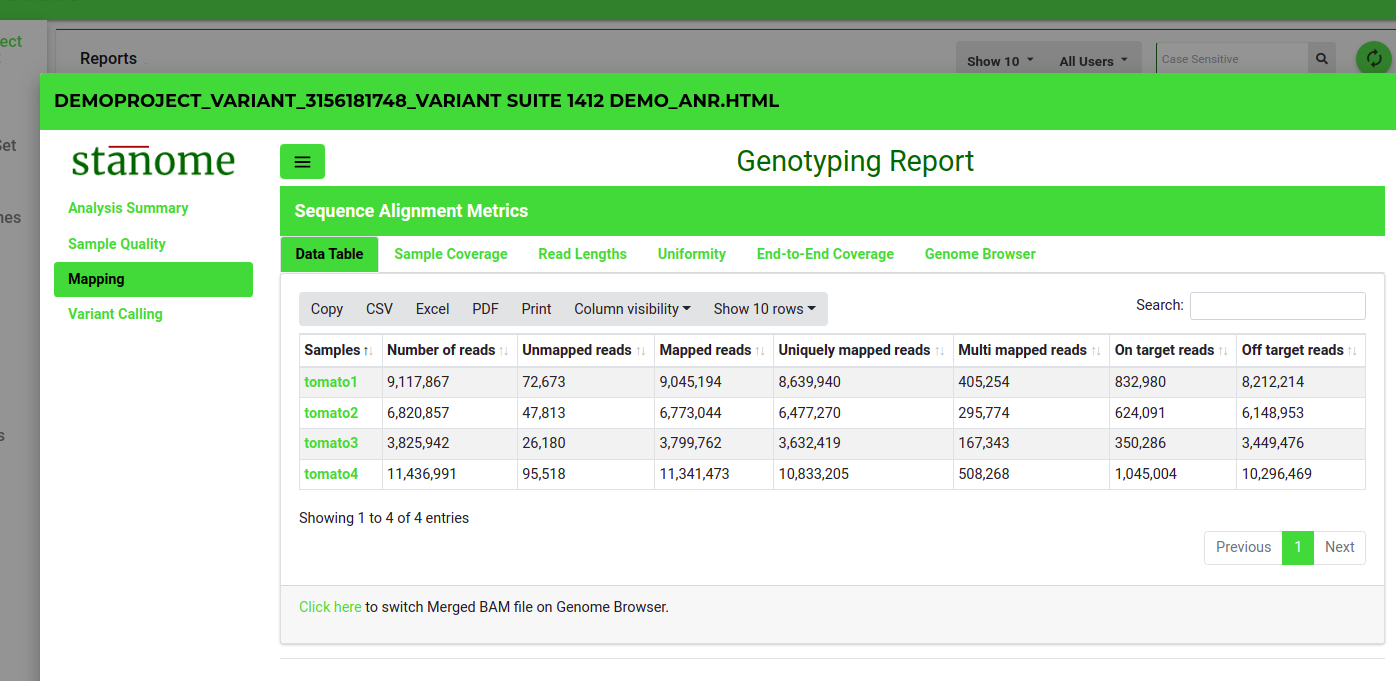
1. 1. 1. <span style="font-size: 12pt; font-family: Montserrat, sans-serif; background-color: transparent; font-weight: 400; font-style: normal; font-variant: normal; text-decoration-line: underline; text-decoration-skip-ink: none; white-space: pre-wrap;">Data Table</span><span style="font-size: 12pt; font-family: Montserrat, sans-serif; background-color: transparent; font-weight: 400; font-style: normal; font-variant: normal; white-space: pre-wrap;">: This (Fig. 1) shows several alignment statistics such as the number of total processed reads, the number of mapped or multi-mapped reads, and the uniquely mapped reads.</span>
        2. <span style="font-size: 12pt; font-family: Montserrat, sans-serif; background-color: transparent; font-weight: 400; font-style: normal; font-variant: normal; text-decoration-line: underline; text-decoration-skip-ink: none; white-space: pre-wrap;">Sample Coverage</span><span style="font-size: 12pt; font-family: Montserrat, sans-serif; background-color: transparent; font-weight: 400; font-style: normal; font-variant: normal; white-space: pre-wrap;">: Allows users to explore the alignment quality through a series of plots. </span><span style="font-size: 12pt; font-family: Montserrat, sans-serif; background-color: transparent; font-weight: 400; font-style: normal; font-variant: normal; white-space: pre-wrap;">Sample depth of coverage in total read counts. </span><span style="font-size: 12pt; font-family: Montserrat, sans-serif; background-color: transparent; font-weight: 400; font-style: normal; font-variant: normal; white-space: pre-wrap;">Sample depth of coverage in percentages. </span><span style="font-size: 12pt; font-family: Montserrat, sans-serif; background-color: transparent; font-weight: 400; font-style: normal; font-variant: normal; white-space: pre-wrap;">On-target mapping quality in a 96-well plate format</span>
        3. <span style="font-size: 12pt; font-family: Montserrat, sans-serif; background-color: transparent; font-weight: 400; font-style: normal; font-variant: normal; text-decoration-line: underline; text-decoration-skip-ink: none; white-space: pre-wrap;">Read Lengths:</span><span style="font-size: 12pt; font-family: Montserrat, sans-serif; background-color: transparent; font-weight: 400; font-style: normal; font-variant: normal; white-space: pre-wrap;"> Histograms and 96-well plate plots show the read length distributions for mapped and unmapped reads.</span>
        4. <span style="font-size: 12pt; font-family: Montserrat, sans-serif; background-color: transparent; font-weight: 400; font-style: normal; font-variant: normal; text-decoration-line: underline; text-decoration-skip-ink: none; white-space: pre-wrap;">Genome Browser:</span><span style="font-size: 12pt; font-family: Montserrat, sans-serif; background-color: transparent; font-weight: 400; font-style: normal; font-variant: normal; white-space: pre-wrap;"> Aligned reads against the reference genome can be viewed for each sample. The genome browser is interactive and allows exploratory analysis.</span>

![Fig. 1. Alignment statistics in the report.](https://docs.stanome.com/uploads/images/gallery/2022-01/embedded-image-ympnqso2.png)

<span style="font-size: 14pt; font-family: Montserrat, sans-serif; color: #000000; background-color: transparent; font-weight: bold; font-style: normal; font-variant: normal; white-space: pre-wrap;"> </span><span style="font-size: 14pt; font-family: Montserrat, sans-serif; color: #6aa84f; background-color: transparent; font-weight: bold; font-style: normal; font-variant: normal; white-space: pre-wrap;">Variant Calling</span>

<span style="font-size: 12pt; font-family: Montserrat, sans-serif; color: #232a3c; background-color: transparent; font-weight: 400; font-style: normal; font-variant: normal; white-space: pre-wrap;">This section provides details of the abundance/mapping statistics. This section also has three sub-sections: </span>

1. 1. 1. 1. <span style="font-size: 12pt; font-family: Montserrat, sans-serif; background-color: transparent; font-weight: 400; font-style: normal; font-variant: normal; text-decoration-line: underline; text-decoration-skip-ink: none; white-space: pre-wrap;">Call Rate Summary</span><span style="font-size: 12pt; font-family: Montserrat, sans-serif; background-color: transparent; font-weight: 400; font-style: normal; font-variant: normal; white-space: pre-wrap;">: Provides a summary of the genotype calls.</span>
            2. <span style="font-size: 12pt; font-family: Montserrat, sans-serif; background-color: transparent; font-weight: 400; font-style: normal; font-variant: normal; text-decoration-line: underline; text-decoration-skip-ink: none; white-space: pre-wrap;">Target Call Rates</span><span style="font-size: 12pt; font-family: Montserrat, sans-serif; background-color: transparent; font-weight: 400; font-style: normal; font-variant: normal; white-space: pre-wrap;">: Genotype calling metrics for the top 100 targets are shown in the table format. The complete list can be downloaded from the </span><span style="font-size: 12pt; font-family: Montserrat, sans-serif; background-color: transparent; font-weight: bold; font-style: normal; font-variant: normal; white-space: pre-wrap;">Reports</span><span style="font-size: 12pt; font-family: Montserrat, sans-serif; background-color: transparent; font-weight: 400; font-style: normal; font-variant: normal; white-space: pre-wrap;"> section. The position field is cross-linked to the Variant Browser. This section also shows:</span>
                1. <span style="font-size: 12pt; font-family: Montserrat, sans-serif; background-color: transparent; font-weight: 400; font-style: normal; font-variant: normal; white-space: pre-wrap;">Genotype call distribution</span>
                2. <span style="font-size: 12pt; font-family: Montserrat, sans-serif; background-color: transparent; font-weight: 400; font-style: normal; font-variant: normal; white-space: pre-wrap;">Genotype Heatmap</span>
            3. <span style="font-size: 12pt; font-family: Montserrat, sans-serif; background-color: transparent; font-weight: 400; font-style: normal; font-variant: normal; text-decoration-line: underline; text-decoration-skip-ink: none; white-space: pre-wrap;">Sample Call Rates</span><span style="font-size: 12pt; font-family: Montserrat, sans-serif; background-color: transparent; font-weight: 400; font-style: normal; font-variant: normal; white-space: pre-wrap;">: Histograms and 96-well plate plots show the call rate distributions from all the samples.</span>
            4. <span style="font-size: 12pt; font-family: Montserrat, sans-serif; background-color: transparent; font-weight: 400; font-style: normal; font-variant: normal; text-decoration-line: underline; text-decoration-skip-ink: none; white-space: pre-wrap;">Genotypes:</span><span style="font-size: 12pt; font-family: Montserrat, sans-serif; background-color: transparent; font-weight: 400; font-style: normal; font-variant: normal; white-space: pre-wrap;"> Shows table of genotypes obtained for each marker across all the samples</span>
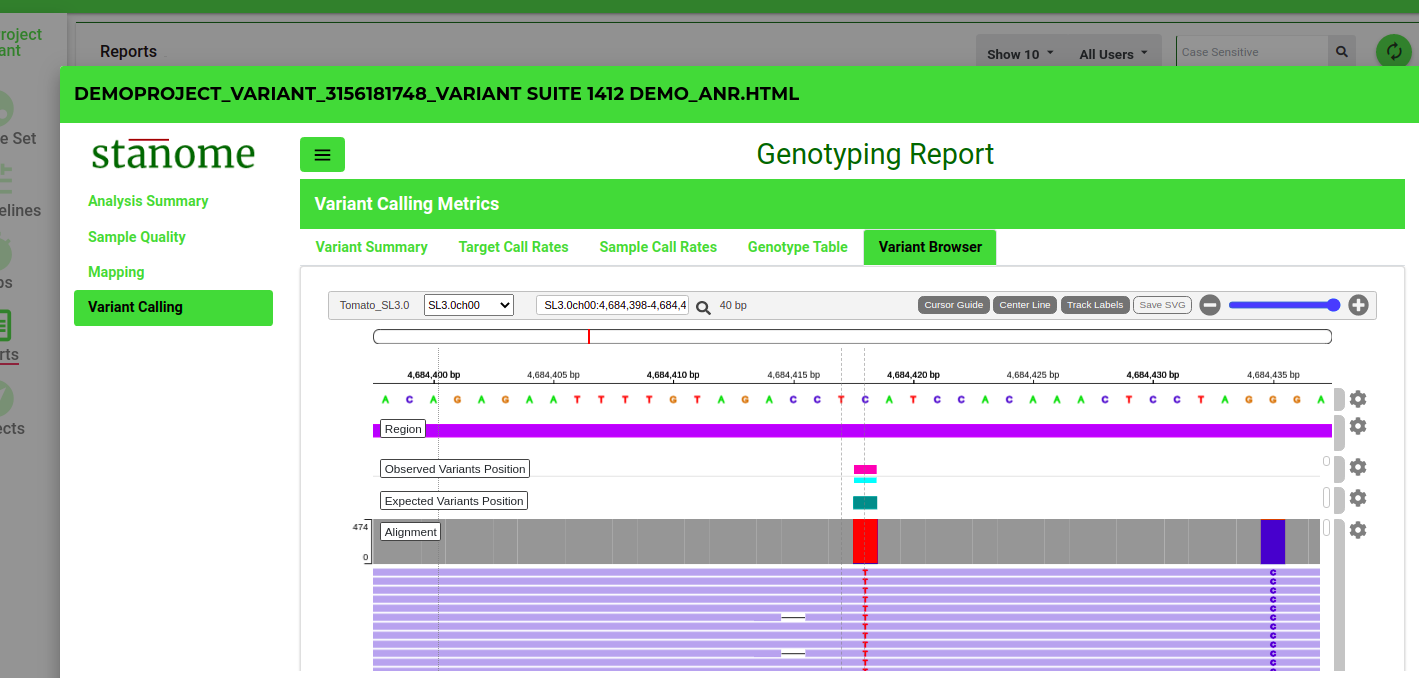
            5. <span style="font-size: 12pt; font-family: Montserrat, sans-serif; background-color: transparent; font-weight: 400; font-style: normal; font-variant: normal; text-decoration-line: underline; text-decoration-skip-ink: none; white-space: pre-wrap;">Variant Browser:</span><span style="font-size: 12pt; font-family: Montserrat, sans-serif; background-color: transparent; font-weight: 400; font-style: normal; font-variant: normal; white-space: pre-wrap;"> Sequencing reads support for each variant can be viewed for each sample (Fig. 2). The genome browser is interactive and allows exploratory analysis.</span>

![Fig. 2. The variant browser in the report.](https://docs.stanome.com/uploads/images/gallery/2022-01/embedded-image-dcihgcll.png)

# Transcript Report

<span style="font-size: 12pt; font-family: Montserrat, sans-serif; color: #000000; background-color: transparent; font-weight: 400; font-style: normal; font-variant: normal; white-space: pre-wrap;">This report contains three exclusive sections.</span>

#### <span style="font-size: 14pt; font-family: Montserrat, sans-serif; color: #000000; background-color: transparent; font-weight: bold; font-style: normal; font-variant: normal; white-space: pre-wrap;"> </span><span style="font-size: 14pt; font-family: Montserrat, sans-serif; color: #6aa84f; background-color: transparent; font-weight: bold; font-style: normal; font-variant: normal; white-space: pre-wrap;">Mapping (Salmon/Kallisto):</span><span style="font-size: 14pt; font-family: Montserrat, sans-serif; color: #000000; background-color: transparent; font-weight: bold; font-style: normal; font-variant: normal; white-space: pre-wrap;"> </span>

<span style="font-size: 12pt; font-family: Montserrat, sans-serif; color: #232a3c; background-color: transparent; font-weight: 400; font-style: normal; font-variant: normal; white-space: pre-wrap;">This section provides details of the abundance/mapping statistics. This section also has two sub-sections:</span>

1. 1. 1. <span style="font-size: 12pt; font-family: Montserrat, sans-serif; background-color: transparent; font-weight: 400; font-style: normal; font-variant: normal; text-decoration-line: underline; text-decoration-skip-ink: none; white-space: pre-wrap;">Data Table</span><span style="font-size: 12pt; font-family: Montserrat, sans-serif; background-color: transparent; font-weight: 400; font-style: normal; font-variant: normal; white-space: pre-wrap;">: This shows several quasi-alignment statistics such as the number of total processed reads, the number of mapped or multi-mapped reads, and the uniquely mapped reads.</span>
        2. <span style="font-size: 12pt; font-family: Montserrat, sans-serif; background-color: transparent; font-weight: 400; font-style: normal; font-variant: normal; text-decoration-line: underline; text-decoration-skip-ink: none; white-space: pre-wrap;">Plots</span><span style="font-size: 12pt; font-family: Montserrat, sans-serif; background-color: transparent; font-weight: 400; font-style: normal; font-variant: normal; white-space: pre-wrap;">: Show the sample depth of coverage plots ( mapped and unmapped reads) in raw numbers and percentages.</span>

#### <span style="font-size: 14pt; font-family: Montserrat, sans-serif; color: #000000; background-color: transparent; font-weight: bold; font-style: normal; font-variant: normal; white-space: pre-wrap;"> </span><span style="font-size: 14pt; font-family: Montserrat, sans-serif; color: #6aa84f; background-color: transparent; font-weight: bold; font-style: normal; font-variant: normal; white-space: pre-wrap;">Differential Expression (DE):</span><span style="font-size: 14pt; font-family: Montserrat, sans-serif; color: #000000; background-color: transparent; font-weight: bold; font-style: normal; font-variant: normal; white-space: pre-wrap;"> </span>

<span style="font-size: 12pt; font-family: Montserrat, sans-serif; color: #232a3c; background-color: transparent; font-weight: 400; font-style: normal; font-variant: normal; white-space: pre-wrap;">Details of the differential expression analysis are dynamically displayed for the pipelines which contain the DE step. This has the following four sub-sections:</span>

1. 1. 1. <span style="font-size: 12pt; font-family: Montserrat, sans-serif; background-color: transparent; font-weight: 400; font-style: normal; font-variant: normal; text-decoration-line: underline; text-decoration-skip-ink: none; white-space: pre-wrap;">Data Table</span><span style="font-size: 12pt; font-family: Montserrat, sans-serif; background-color: transparent; font-weight: 400; font-style: normal; font-variant: normal; white-space: pre-wrap;">: Top 200 most significant Differentially Expressed Genes (DEGs) are listed in tabular format. The table also provides fold change values, confidence levels, and various other parameters. The tool and its various parameters that were used for identifying the DEGs are described briefly below the table. All the important parameters are also described.</span>
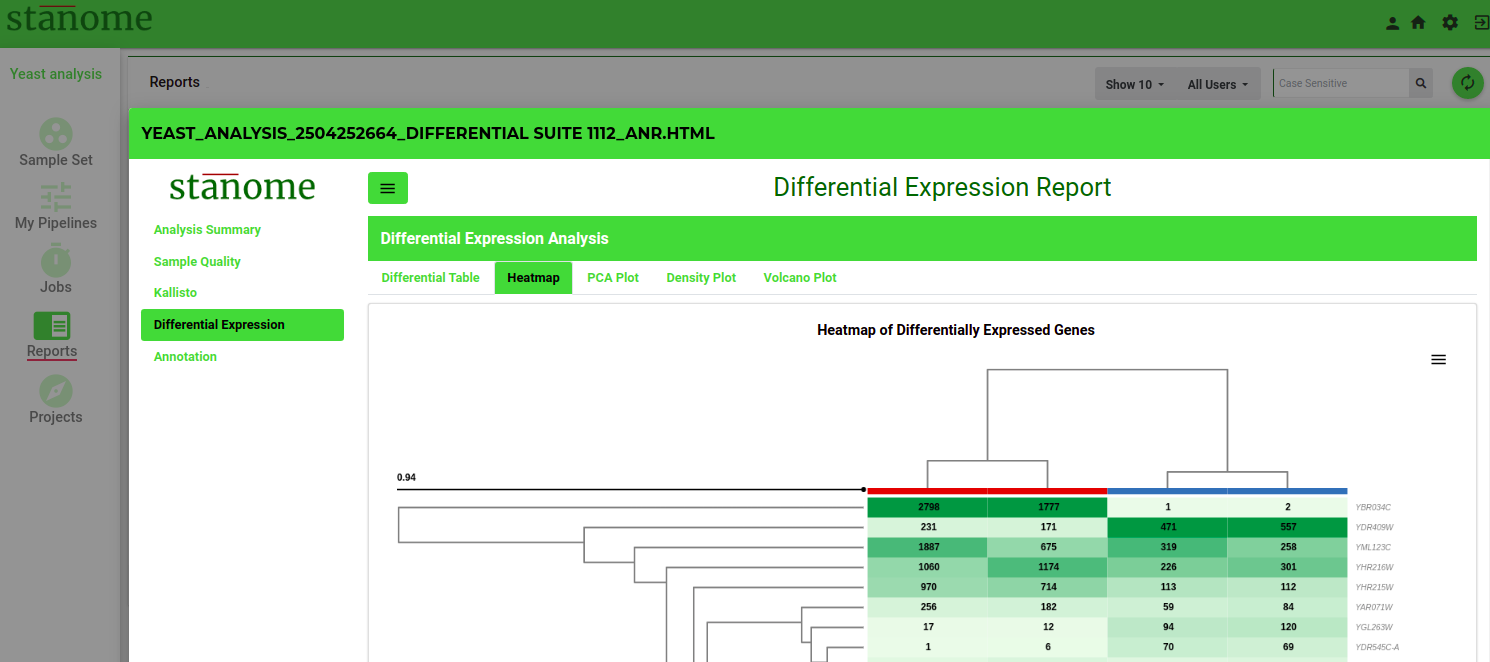
        2. <span style="font-size: 12pt; font-family: Montserrat, sans-serif; background-color: transparent; font-weight: 400; font-style: normal; font-variant: normal; text-decoration-line: underline; text-decoration-skip-ink: none; white-space: pre-wrap;">Heatmap</span><span style="font-size: 12pt; font-family: Montserrat, sans-serif; background-color: transparent; font-weight: 400; font-style: normal; font-variant: normal; white-space: pre-wrap;">: The heatmap (Fig. 1) of the top 200 DEGs. Heatmap visualizes the comparison of DEGs expression across samples and within the sample. A brief description below the map enables users to understand and interpret heatmaps. The red color rectangle in the heatmap indicates the upregulation of a gene and the blue color indicates downregulation.</span>
        3. <span style="font-size: 12pt; font-family: Montserrat, sans-serif; background-color: transparent; font-weight: 400; font-style: normal; font-variant: normal; text-decoration-line: underline; text-decoration-skip-ink: none; white-space: pre-wrap;">PCA &amp; Volcano Plots</span><span style="font-size: 12pt; font-family: Montserrat, sans-serif; background-color: transparent; font-weight: 400; font-style: normal; font-variant: normal; white-space: pre-wrap;">: A PCA plot enables users to visualize the variability in the replicates of the two experimental conditions compared. All replicates of a condition are depicted with the same color. Grouping of samples indicates if replicates are similar among the same condition versus between the conditions. </span>
        4. <span style="font-size: 12pt; font-family: Montserrat, sans-serif; color: #232a3c; background-color: transparent; font-weight: 400; font-style: normal; font-variant: normal; white-space: pre-wrap;">The volcano plot shows significantly differentially expressed genes. It is a scatter plot between log fold change of expression among different biological conditions and the significance of the change determined from the p-value. Volcano plots enable visual inspection of expression change across all the genes.</span>
        5. <span style="font-size: 12pt; font-family: Montserrat, sans-serif; background-color: transparent; font-weight: 400; font-style: normal; font-variant: normal; text-decoration-line: underline; text-decoration-skip-ink: none; white-space: pre-wrap;">Density</span><span style="font-size: 12pt; font-family: Montserrat, sans-serif; background-color: transparent; font-weight: 400; font-style: normal; font-variant: normal; white-space: pre-wrap;">: Shows normalization plots of samples normalized to overcome bias due to Read size and mRNA content.</span>

![Fig. 1. Heatmap of DE genes in the report.](https://docs.stanome.com/uploads/images/gallery/2022-01/embedded-image-wyxclemg.png)

#### <span style="font-size: 14pt; font-family: Montserrat, sans-serif; color: #6aa84f; background-color: transparent; font-weight: bold; font-style: normal; font-variant: normal; white-space: pre-wrap;">Annotation (FGSEA):</span><span style="font-size: 14pt; font-family: Montserrat, sans-serif; color: #000000; background-color: transparent; font-weight: bold; font-style: normal; font-variant: normal; white-space: pre-wrap;"> </span>

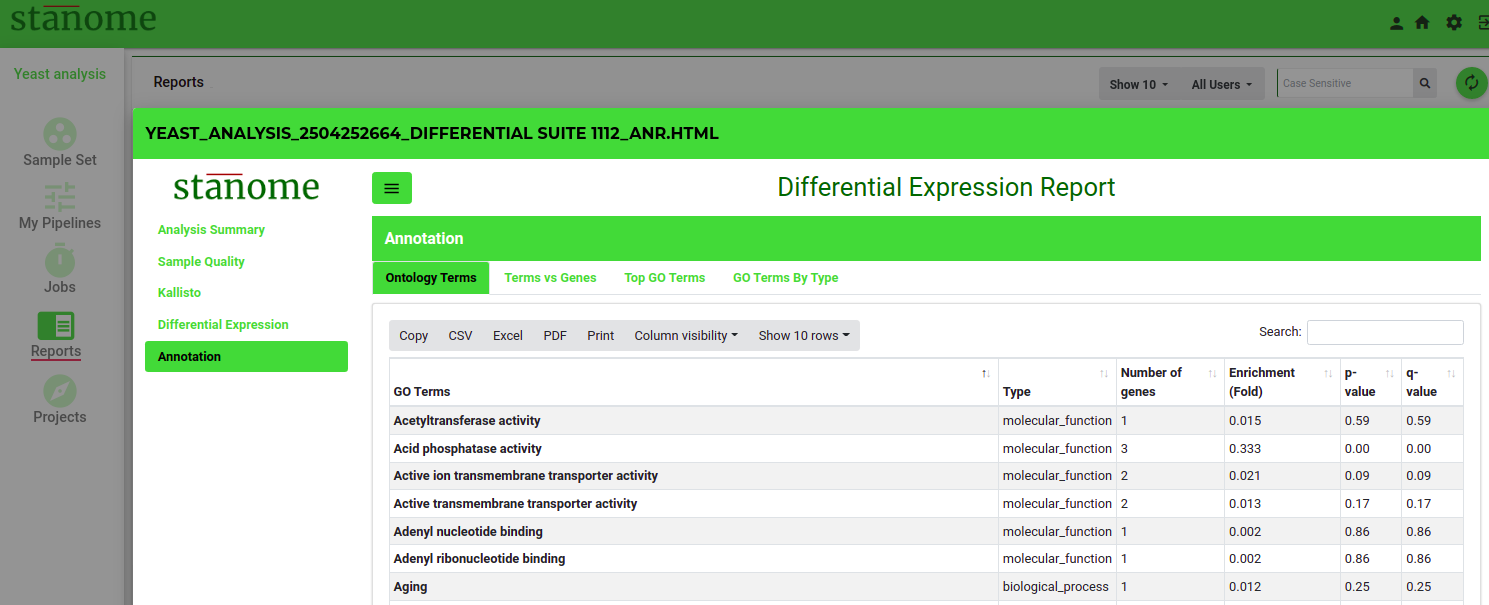
<span style="font-size: 12pt; font-family: Montserrat, sans-serif; color: #232a3c; background-color: transparent; font-weight: 400; font-style: normal; font-variant: normal; white-space: pre-wrap;">Describes </span><span style="font-size: 12pt; font-family: Montserrat, sans-serif; color: #232a3c; background-color: transparent; font-weight: 400; font-style: italic; font-variant: normal; white-space: pre-wrap;">Pathway analysis</span><span style="font-size: 12pt; font-family: Montserrat, sans-serif; color: #232a3c; background-color: transparent; font-weight: 400; font-style: normal; font-variant: normal; white-space: pre-wrap;"> for DEGs (Fig.2). The top 100 enriched pathways are shown in the table along with their p-value and the total number of DEGs belonging to the pathway. This section also shows a bubble plot of the enriched pathways wherein the location of the bubble is determined from %DE genes in the enriched pathway to the total number of genes in the pathway.</span>

![Fig. 2. Pathway annotation of DE genes in the report.](https://docs.stanome.com/uploads/images/gallery/2022-01/embedded-image-bcjbq5pl.png)