# Overview

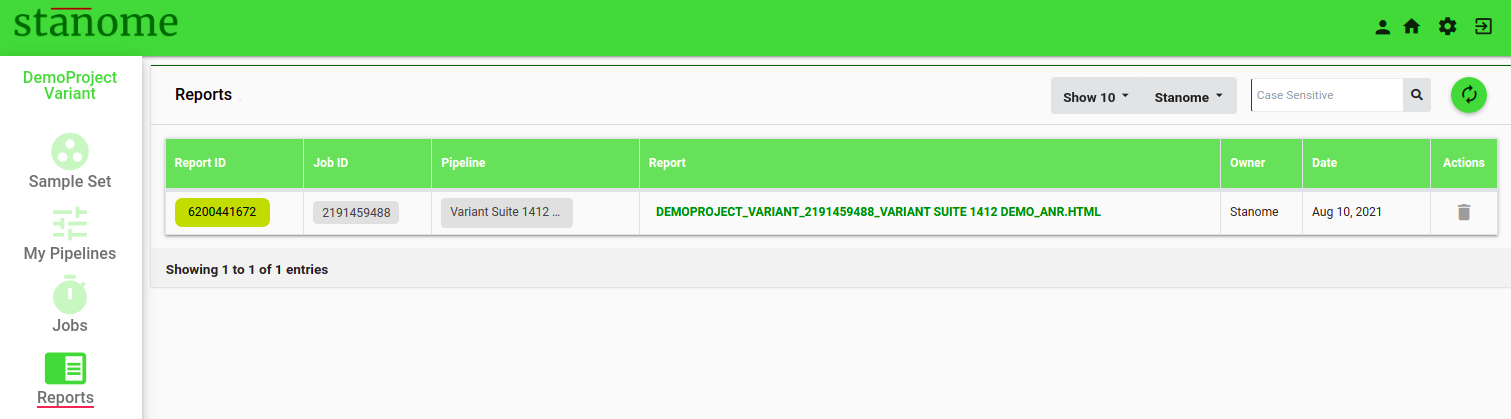
<span id="bkmrk-each-pipeline-execut-0" style="font-size: 12pt; font-family: Montserrat, sans-serif; color: #232a3c; background-color: transparent; font-weight: 400; font-style: normal; font-variant: normal; white-space: pre-wrap;">Each pipeline execution generates an HTML report. The final report and other files can be accessed through the Reports window</span><span style="font-size: 12pt; font-family: Montserrat, sans-serif; color: #232a3c; background-color: transparent; font-weight: 400; font-style: normal; font-variant: normal; white-space: pre-wrap;"><span style="border-width: initial; border-style: none; display: inline-block; overflow: hidden; width: 20px; height: 20px;">![](https://lh5.googleusercontent.com/rmxsNjby7wq96Ban9YE7K6AfGZnnrCEcbR770JKkqk6hkyftmbZfe0PHMHTmol51xG8JOjKtXYEKYeju2CvTdmSKUkGq30oyDAz8rxuGn1Q5tDOiDMadhx8KU-gAkQeqKh-tO4iE)</span></span><span style="font-size: 12pt; font-family: Montserrat, sans-serif; color: #232a3c; background-color: transparent; font-weight: 400; font-style: normal; font-variant: normal; white-space: pre-wrap;"> (Fig.). Reports can also be accessed through the ReportID on the job details page.</span>

[![Fig. 1. Reports Window](https://docs.stanome.com/uploads/images/gallery/2022-01/scaled-1680-/image-1643364378029.png)](https://docs.stanome.com/uploads/images/gallery/2022-01/image-1643364378029.png)

<span style="font-size: 12pt; font-family: Montserrat, sans-serif; color: #232a3c; background-color: transparent; font-weight: 400; font-style: normal; font-variant: normal; white-space: pre-wrap;"> </span>

- <span style="font-size: 12pt; font-family: Montserrat, sans-serif; background-color: transparent; font-weight: 400; font-style: normal; font-variant: normal; white-space: pre-wrap;">Click </span><span style="font-size: 12pt; font-family: Montserrat, sans-serif; background-color: transparent; font-weight: bold; font-style: normal; font-variant: normal; white-space: pre-wrap;">Report ID</span><span style="font-size: 12pt; font-family: Montserrat, sans-serif; background-color: transparent; font-weight: 400; font-style: normal; font-variant: normal; white-space: pre-wrap;"> to access intermediate files from a few important steps in the pipeline. </span>
- <span style="font-size: 12pt; font-family: Montserrat, sans-serif; background-color: transparent; font-weight: 400; font-style: normal; font-variant: normal; white-space: pre-wrap;">Click the </span><span style="font-size: 12pt; font-family: Montserrat, sans-serif; background-color: transparent; font-weight: bold; font-style: normal; font-variant: normal; white-space: pre-wrap;">PREFIX\_ANR.HTML</span><span style="font-size: 12pt; font-family: Montserrat, sans-serif; background-color: transparent; font-weight: 400; font-style: normal; font-variant: normal; white-space: pre-wrap;"> to access the final downloadable report. Default: NO REPORT AVAILABLE. </span>

<span style="font-size: 12pt; font-family: Montserrat, sans-serif; color: #232a3c; background-color: transparent; font-weight: 400; font-style: normal; font-variant: normal; white-space: pre-wrap;">Reports are generated dynamically based on the analysis type and each report is divided into sections based on the tools used in the pipeline. The first two sections are generated for all the jobs to provide the job overview: analysis summary and sample quality.</span>

- <span style="font-size: 14pt; font-family: Montserrat, sans-serif; color: #6aa84f; background-color: transparent; font-weight: bold; font-style: normal; font-variant: normal; white-space: pre-wrap;">Analysis Summary:</span><span style="font-size: 14pt; font-family: Montserrat, sans-serif; color: #000000; background-color: transparent; font-weight: bold; font-style: normal; font-variant: normal; white-space: pre-wrap;"> </span>

<span style="font-size: 12pt; font-family: Montserrat, sans-serif; color: #232a3c; background-color: transparent; font-weight: 400; font-style: normal; font-variant: normal; white-space: pre-wrap;">This section consolidates the information related to the job: project, samples, and the experiment in four sub-sections:</span>

- - - <span style="font-size: 12pt; font-family: Montserrat, sans-serif; background-color: transparent; font-weight: 400; font-style: normal; font-variant: normal; text-decoration-line: underline; text-decoration-skip-ink: none; white-space: pre-wrap;">Project Details</span><span style="font-size: 12pt; font-family: Montserrat, sans-serif; background-color: transparent; font-weight: 400; font-style: normal; font-variant: normal; white-space: pre-wrap;">: This shows the information provided during the project creation and</span> the pipeline details.
        - <span style="font-size: 12pt; font-family: Montserrat, sans-serif; background-color: transparent; font-weight: 400; font-style: normal; font-variant: normal; text-decoration-line: underline; text-decoration-skip-ink: none; white-space: pre-wrap;">Run Summary</span><span style="font-size: 12pt; font-family: Montserrat, sans-serif; background-color: transparent; font-weight: 400; font-style: normal; font-variant: normal; white-space: pre-wrap;">: Displays the job status, runtimes, and the files used for the analysis: reference, annotation or metadata files, and the samples.</span>
        - <span style="font-size: 12pt; font-family: Montserrat, sans-serif; background-color: transparent; font-weight: 400; font-style: normal; font-variant: normal; text-decoration-line: underline; text-decoration-skip-ink: none; white-space: pre-wrap;">Tools</span><span style="font-size: 12pt; font-family: Montserrat, sans-serif; background-color: transparent; font-weight: 400; font-style: normal; font-variant: normal; white-space: pre-wrap;">: A brief summary of the tools, versions, descriptions, and citations is shown. </span>
        - <span style="font-size: 12pt; font-family: Montserrat, sans-serif; background-color: transparent; font-weight: 400; font-style: normal; font-variant: normal; text-decoration-line: underline; text-decoration-skip-ink: none; white-space: pre-wrap;">Commands:</span><span style="font-size: 12pt; font-family: Montserrat, sans-serif; background-color: transparent; font-weight: 400; font-style: normal; font-variant: normal; white-space: pre-wrap;"> A complete list of the commands used in the pipeline.</span>
- <span style="font-size: 14pt; font-family: Montserrat, sans-serif; color: #6aa84f; background-color: transparent; font-weight: bold; font-style: normal; font-variant: normal; text-decoration-line: underline; text-decoration-skip-ink: none; white-space: pre-wrap;">Sample Quality</span><span style="font-size: 14pt; font-family: Montserrat, sans-serif; color: #6aa84f; background-color: transparent; font-weight: bold; font-style: normal; font-variant: normal; white-space: pre-wrap;">:</span><span style="font-size: 14pt; font-family: Montserrat, sans-serif; color: #000000; background-color: transparent; font-weight: bold; font-style: normal; font-variant: normal; white-space: pre-wrap;"> </span>

<span style="font-size: 12pt; font-family: Montserrat, sans-serif; color: #232a3c; background-color: transparent; font-weight: 400; font-style: normal; font-variant: normal; white-space: pre-wrap;">Details of sample (sequencing) quality are provided in this section. It has two sub-sections:</span>

- - - <span style="font-size: 12pt; font-family: Montserrat, sans-serif; background-color: transparent; font-weight: 400; font-style: normal; font-variant: normal; text-decoration-line: underline; text-decoration-skip-ink: none; white-space: pre-wrap;">Metrics Table</span><span style="font-size: 12pt; font-family: Montserrat, sans-serif; background-color: transparent; font-weight: 400; font-style: normal; font-variant: normal; white-space: pre-wrap;">: This shows the sequence quality details of each sample in a tabular format. </span>
        - <span style="font-size: 12pt; font-family: Montserrat, sans-serif; background-color: transparent; font-weight: 400; font-style: normal; font-variant: normal; text-decoration-line: underline; text-decoration-skip-ink: none; white-space: pre-wrap;">Sample Quality Plot</span><span style="font-size: 12pt; font-family: Montserrat, sans-serif; background-color: transparent; font-weight: 400; font-style: normal; font-variant: normal; white-space: pre-wrap;">: The average quality scores (Phred scale) of all the reads in a sample are displayed in a 96-Well plate format, each circle representing a sample. The higher the score, the better, and scores above 30 are generally considered good for the majority of the applications. Average scores are calculated using all the reads in a sample with the FastQC tool. The 96-Well plate format helps to visualize the low-quality samples, plate effects, and pooling errors easily.</span>

<span style="font-size: 12pt; font-family: Montserrat, sans-serif; color: #232a3c; background-color: transparent; font-weight: 400; font-style: normal; font-variant: normal; white-space: pre-wrap;">The remaining sections are dynamically generated based on the pipeline type and the tools used. Two sample reports are provided below to understand the features of each report.</span>